You buy a new wireless charger, lay your phone down, and wake up to find the battery barely moved. The culprit often isn't the charger at all — it's the case wrapped around your phone.
Why case thickness decides charging speed
Qi wireless charging works through electromagnetic induction. A coil in the charger transfers energy to a receiving coil inside your phone. Whatever sits between those two coils — your case — either helps or hurts that transfer.
Most phones charge reliably with cases that stay under roughly 3mm thick. Slim polycarbonate, TPU, silicone, thin leather, and fabric cases usually pass energy through without much loss. The trouble starts with rugged "armor" cases built with thick bumper layers.
The metal case problem most buyers ignore
Metal is the single biggest enemy of wireless charging. Aluminum and steel cases block electromagnetic fields almost entirely, which means charging may not start at all.
Magnetic plates stuck onto the back of a phone for car mounts cause a similar issue. These plates sit directly in the charging path, and in some cases they heat up during charging. If you use a magnetic mount plate, you may need to remove it before placing the phone on a wireless pad.
MagSafe cases change the equation
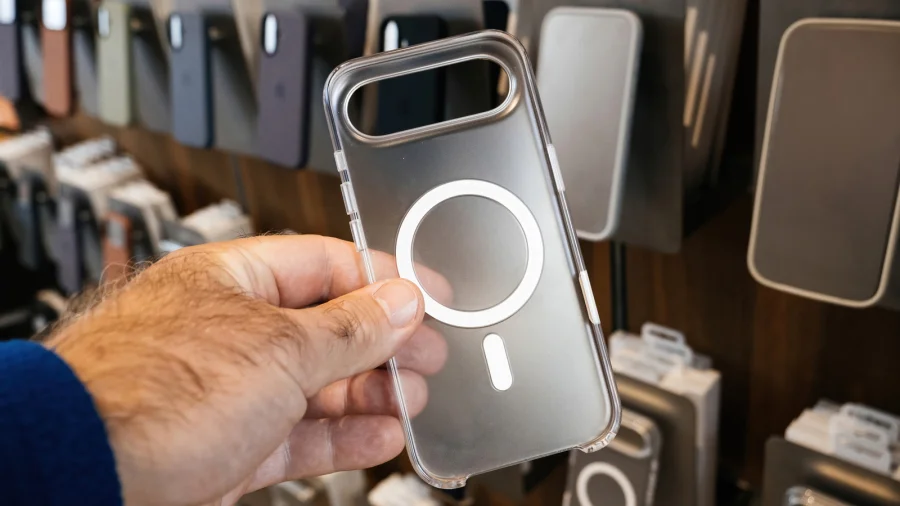
Apple's MagSafe uses a ring of magnets built into the iPhone to lock the charger coil into perfect alignment with the phone. Third-party cases marked MagSafe-compatible embed the same magnet ring, so charging speed stays consistent even with the case on.
But the magnet alignment only helps if the case itself stays thin. A thick MagSafe case still slows down power transfer because distance between the coils grows.
Battery cases, card holders, and everyday friction
Battery cases add internal cells that recharge wirelessly, but they are notorious for slow top-ups. They generate extra heat and add significant thickness, so charging speeds drop noticeably compared with a direct cable connection.
Card holders and anything else sandwiched between phone and charging pad need to come off. Even one thick credit card in a folio case is enough to interrupt the signal.
How to test whether your current case is the problem
A simple 30-minute test settles the debate. Note your battery level, charge with the case on for 30 minutes, and record the gain. Repeat the same test with the case removed. If the difference is dramatic, the case is costing you speed.
Also check alignment on the charging pad, and try placing the phone for a few extra seconds to confirm the charging indicator appears. A case that is only slightly off-center can keep the phone from registering a charge at all.
A quick guide to buying the right case
For consistent wireless charging, look for a case that is slim, flexible, and free of metal parts. On iPhone, choose a MagSafe-compatible case so the magnets stay aligned.
Check for Qi certification on the case packaging. This certification means the case has been tested to work with standard Qi wireless chargers. Brand-name rugged cases from makers like OtterBox often list wireless charging compatibility — but usually with the fine print that it works more slowly than without a case.
Risks and limits: what case makers don't tell you
Wireless charging produces heat, and a thick case traps that heat against the phone. Heat is the long-term enemy of lithium-ion batteries, so a chunky case can affect battery health over months of nightly charging.
There is a trade-off in every purchase: maximum drop protection usually means thicker padding, and thicker padding means slower wireless charging. Buyers who depend on wireless charging every day should not ignore that trade-off.
The wider shift toward magnetic charging
MagSafe popularised magnets, but the trend is now spreading beyond Apple. The Qi2 standard brings magnetic alignment to Android devices, which means case makers are redesigning products around embedded magnet rings.
Expect more cases across all price points to advertise magnetic compatibility rather than just standard wireless charging support.
Practical guidance for your next purchase
If wireless charging is a daily habit, choose a case under 3mm thick in TPU, polycarbonate, or silicone. Avoid full-metal cases and any case with a metal plate glued to the back.
If drop protection matters more, accept that you will need to remove the case for fast wireless top-ups or rely on cable charging instead. No single case is perfect for both scenarios.
Future outlook: where case design is heading
As Qi2 spreads, magnetic alignment will become standard across most new phones. That will make wireless charging more reliable through cases, but thickness will still matter as charging speeds increase.
Faster chargers generate more heat, so future cases will likely mix magnet systems with better heat management. For now, the simplest rule still stands: keep it thin, keep it non-metal, and keep the charging path clear.
Our Take
The best phone case for wireless charging is the one you never have to remove. Protection is important, but a case that quietly doubles your charging time every single night is a hidden cost most buyers don't anticipate. Testing your case before committing to a wireless charging routine is the smartest move most people skip.
Frequently Asked Questions
Do all phone cases work with wireless charging?
No. Metal cases block the electromagnetic signal and usually prevent charging entirely. Very thick cases also slow charging because they increase the distance between the charger coil and the phone's receiving coil.
Why is my phone charging slowly with a case on?
The case adds distance and sometimes interference between the charger and the phone. Thick materials, embedded metal plates, and even card holders reduce the efficiency of power transfer, which slows the charging speed.
Is a MagSafe case better for wireless charging?
For iPhone users, yes. A MagSafe-compatible case keeps the charger coil aligned with the phone's coil using magnets, which helps maintain consistent charging speed. But the case still needs to be relatively thin to work well.
Can a phone case damage a wireless charger?
Not directly, but metal plates or magnetic accessories stuck on the back of a phone can overheat during wireless charging. The heat is a risk to both the charger and the phone battery over time.