The video call froze. The file upload crawled. The Wi-Fi hotspot you're depending on keeps cutting out — right before a deadline, a presentation, or a conversation you can't afford to lose. Before you blame your carrier, there is a faster, more reliable option that is probably sitting in your drawer right now: USB tethering.
What Is USB Tethering, Explained in Plain Terms
USB tethering shares your phone's mobile data connection with a computer through a physical USB cable. Instead of broadcasting a Wi-Fi signal, your phone acts as a wired modem, and your laptop uses that cable as its internet link.
No Wi-Fi adapter is involved. No wireless signal leaves the phone. The connection is entirely physical, which is exactly why it behaves differently from a hotspot.
Why a Cable Often Beats a Wi-Fi Hotspot
A wired connection sidesteps the problems that plague wireless hotspots: walls, interference from neighbouring routers, and crowded frequency bands. That means fewer random disconnects and steadier speeds during video calls or large uploads.
Latency also improves. For gaming, VoIP calls, or remote desktop work, the lower ping of a wired link is noticeable. And because the phone is plugged in, it charges while it shares — no battery drain panic halfway through your workday.
How to Enable USB Tethering on Android
Connect your phone to your computer using a USB cable first. Then open Settings > Network & internet > Hotspot & tethering and toggle on USB tethering.
On Samsung phones, the path is Settings > Connections > Mobile Hotspot and Tethering. On older or custom Android skins, search for "tethering" in Settings and the option will appear. If your phone prompts "Allow access to device data?", tap Allow — this permits data transfer rather than just charging.
How to Enable USB Tethering on iPhone
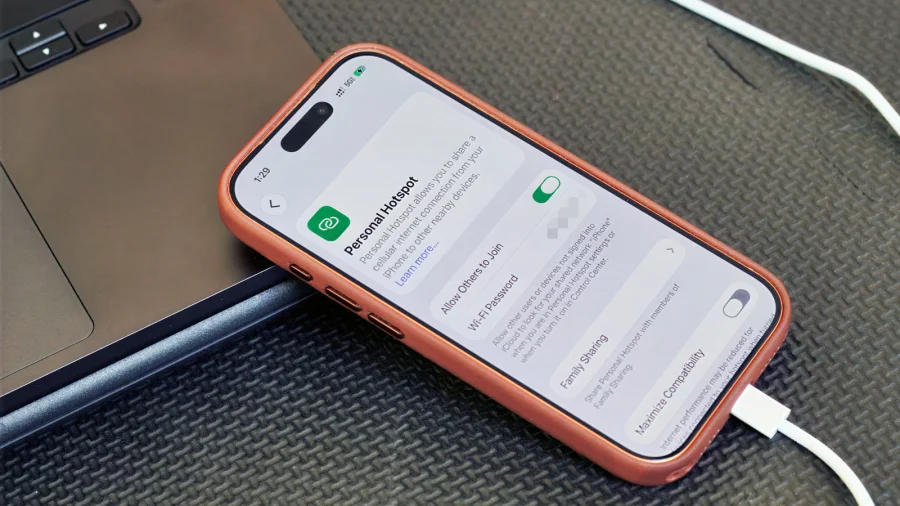
Plug your iPhone into your Mac or PC with a Lightning or USB-C cable. Then go to Settings > Personal Hotspot and toggle on Allow Others to Join. To force a purely wired connection, tap USB Only.
On a Mac, the connection usually appears automatically under Network settings. On Windows, you may need iTunes installed for the driver to be recognised the first time.
Common USB Tethering Problems and Quick Fixes
"Charge-only cable" is the most common culprit. Many bundled cables only carry power. Swap for a cable known to transfer data and try again.
If Windows says the device is unrecognised, update the network adapter driver. If the internet still doesn't work, confirm that mobile data is on — USB tethering shares cellular data, not your Wi-Fi connection. On a Mac, check System Settings > Network for a new USB device entry.
When USB Tethering Won't Help
If you need internet on several devices at once — phone, tablet, laptop, a friend's phone — a Wi-Fi hotspot remains the better tool. USB tethering serves exactly one computer.
Carrier restrictions also matter. Some Indian and global plans block tethering or limit it on cheaper data packs. If tethering is disabled in your plan, the toggle may grey out or fail silently. Also note: a USB cable cannot make a weak cellular signal stronger. Your speed is still capped by what the tower gives you.
The Basic Rule for Choosing Between the Two
Use a Wi-Fi hotspot for convenience and multiple devices. Use USB tethering for critical tasks — stable video calls, large uploads, online exams, or remote work — where one drop could hurt. The cable is your safety net, not a compromise.
Frequently Asked Questions
Does USB tethering use more mobile data than a hotspot?
No. Both methods consume exactly the same data because the same apps and downloads are using your phone's cellular connection. Only the delivery method — cable versus Wi-Fi — changes.
Does USB tethering charge my phone?
In most cases, yes. While connected, the phone draws power from the computer, so the battery often charges during tethering. If the phone only charges and doesn't share data, your cable is likely charge-only, or you dismissed the "Allow data access" prompt.
Is USB tethering faster than a Wi-Fi hotspot?
USB tethering usually delivers lower latency and better stability, which makes it feel faster during calls and real-time work. However, the absolute maximum speed still depends on your mobile network's signal and plan. A wired cable cannot exceed what your tower provides.
Why is USB tethering not working on my phone?
The common reasons are: a charge-only cable, missing USB drivers on the computer, mobile data being turned off, or a carrier plan that blocks hotspot features. Check each in that order, and toggle USB tethering off and on after reconnecting the cable.