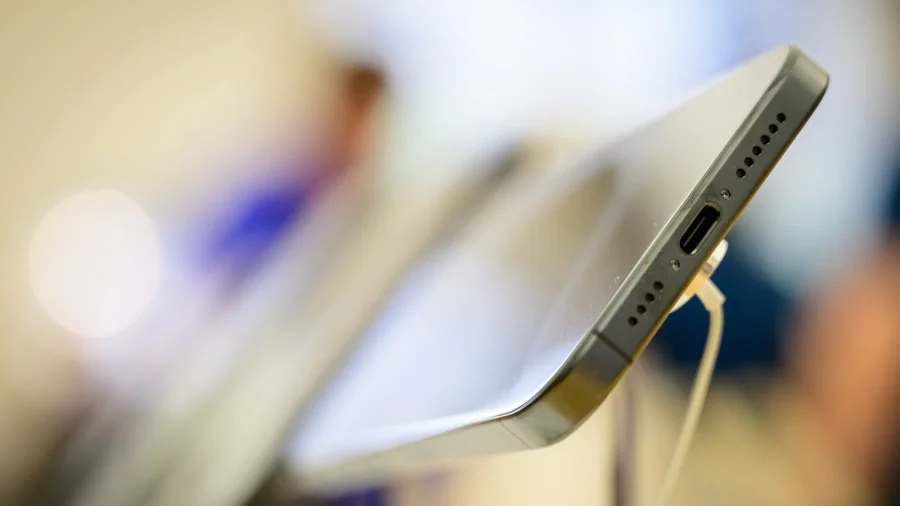
Your phone's USB-C port looks like a simple charging socket. In reality, it's the most capable connection on your device — one that can move files faster than Wi-Fi, output video to a monitor, read a flash drive, or connect a game controller. Most people never use it beyond charging. That's a waste.
Data transfer: why USB-C beats Wi-Fi for moving files
Wireless file sharing is convenient but slow. A USB-C cable connected to a laptop can transfer gigabytes of photos and videos in minutes, depending on the cable and the phone on both ends.
Phones with USB 3.0 or higher support data speeds between 5 Gbps and 10 Gbps — several times faster than typical Wi-Fi transfers. For photographers, video editors, or anyone shifting data to a new phone, this alone makes the port worth understanding.
Turn your phone into a desktop: how video output works
Many flagship phones support DisplayPort Alt Mode over USB-C. That means a single cable can carry video and audio to a monitor, TV or projector while the phone continues charging.
Plug in, and your phone becomes a desktop-style setup — presentations, video streaming, document work — without buying a separate mini PC. Samsung's DeX mode is one well-known example of this feature in action.
One port, endless accessories: the OTG trick
USB On-The-Go (OTG) allows your phone to act as the host device rather than a peripheral. Connect a flash drive to move files, plug in a keyboard for long replies, attach a mouse for precise control, or use a wired game controller for gaming.
A basic OTG adapter costs very little. The same port can also run SD card readers, letting camera files move straight onto the phone without a laptop in between.
How USB-C changed the way we hear music
USB-C carries digital audio. Wired earphones that connect via USB-C use their own digital-to-analog converter, bypassing the phone's internal audio hardware — which can improve sound quality.
That's also why many phones dropped the 3.5mm headphone jack: the USB-C port does the job. Even if your earphones still use the old jack, a USB-C to 3.5mm adapter keeps them working.
Check this before you buy any USB-C accessory
Here's the confusion: every USB-C cable looks similar, but not every cable supports every feature. Some carry power only. Some transfer data slowly. Some handle video output, and some don't.
Before buying, check two things — your phone's USB-C specification, usually listed on the manufacturer's official support page, and the cable's advertised data and video capabilities. A cable labelled USB 3.1 Gen 2 or USB4 is a safer bet than an unlabelled bargain cable.
What the USB-C port cannot do
Not every phone supports video output, even with the right cable. Budget and mid-range models often skip DisplayPort Alt Mode to keep costs down.
Charging speeds vary too — a 120W charger won't push 120W into every phone. And while USB-C is reversible, it isn't fully uniform in practice: some accessories simply won't be compatible with certain handsets. The confirmed facts end where your specific phone model begins.
How USB-C became the one port to rule them all
The USB-C connector was developed by the USB Implementers Forum as a single reversible standard to replace a tangle of older ports — micro-USB, proprietary chargers, separate video cables.
Its push toward universality went further in 2022, when the European Union mandated USB-C as a common charging standard for a wide range of devices. That decision pushed the entire industry in one direction, making the port harder to avoid and easier to rely on.
Why this matters more than the charger in your bag
The USB-C port is closing in on being a true universal socket — data, video, audio and power in one connector. For users, that means fewer cables, fewer proprietary docks and more longevity from existing hardware.
Understanding your port is no longer a tech hobby. It's a practical skill that saves money and reduces clutter, especially as laptops, tablets, earphones and even power banks converge on the same connector.
Three ways to start using your USB-C port today
Start with what costs nothing: plug your phone into a laptop with a USB-C cable and see how fast large file transfers feel compared with wireless sharing.
Next, pick up an inexpensive OTG adapter and try a flash drive or keyboard. Finally, if your phone supports DisplayPort Alt Mode, borrow a monitor cable and see how a desktop setup feels. None of this requires buying a new phone.
What comes next for USB-C
USB4 and the newer USB-C 2.1 specifications push theoretical speeds further — up to 80 Gbps in the latest iterations. More mid-range phones are also expected to gain video output support over time.
For most people, the practical gains are already here: faster backups, bigger screens through a single cable, and fewer accessories to carry. The port you charge with every night is capable of far more than most of us ever ask of it.
Our Take
The most overlooked feature on a modern phone is not in the software — it's in the port. USB-C brought universal charging, but its real long-term value lies in the full ecosystem of data and display features it carries.
The catch is knowing what your specific phone supports, since manufacturers don't always advertise it clearly. Read the spec sheet, test the port, and you may discover your phone can replace a laptop for several everyday tasks.
Frequently Asked Questions
Can I connect my phone to a TV using the USB-C port?
Yes, if your phone supports DisplayPort Alt Mode. Use a USB-C to HDMI cable or adapter to connect the phone to a TV or monitor. Many flagship phones support this, but budget models often do not — check the manufacturer's specification sheet first.
Why is my USB-C flash drive not working on my phone?
Your phone needs to support USB On-The-Go (OTG) to read flash drives. Most Android phones support it. If OTG is available and it still doesn't work, the drive may be formatted in a file system the phone cannot read, such as NTFS.
Does USB-C transfer data faster than Wi-Fi?
Usually yes. USB 3.1 Gen 2 supports up to 10 Gbps, and USB 3.1 Gen 1 supports up to 5 Gbps. Real-world speeds are lower, but a wired USB-C connection still beats typical Wi-Fi transfers when moving large batches of photos and videos.
Can I use any USB-C cable for fast charging?
No. Fast charging requires the cable to support the current your phone draws. Some USB-C cables are power-only or rated for low wattage and cannot handle high-speed charging. Use a certified cable that matches your phone's charging standard for best results.