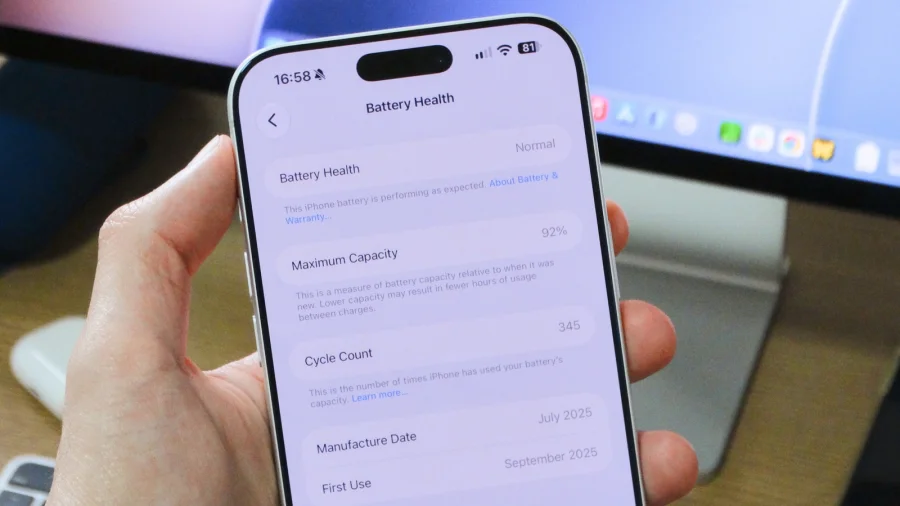
Every iPhone battery is on a quiet countdown. From the moment you unbox the device, each charge cycle nudges it closer to the evening when a phone that once lasted all day suddenly dies before dinner. The uneasy part is that most users never check the one screen Apple built precisely for this — until it's too late.
Where Apple Hides the Battery Health Readout
Open Settings → Battery → Battery Health & Charging and you'll land on a page most iPhone owners have never visited. The headline number is Maximum Capacity, a percentage that compares your battery's current performance against its factory-fresh state.
A battery at 100% is performing exactly as designed. Drop to 90%, and you're running on nine-tenths of the original charge. Apple introduced this screen in iOS 11.3 after widespread criticism over quietly slowing older iPhones, and it has been the official health check ever since.
Why 100 Percent Never Lasts Forever
Battery degradation is physics, not a defect. Every time the iPhone charges and discharges, tiny chemical changes accumulate inside the lithium-ion cell. Apple's engineering target is simple: the battery should retain 80% of original capacity after 500 complete charge cycles under normal use.
A "complete cycle" isn't one plug-in. It's the equivalent of draining 100% of capacity — two 50% charges in a day count as one cycle. On that scale, most heavy users cross the 500-cycle mark somewhere between 18 months and two years of daily use.
How to Find Your iPhone's Cycle Count Without Guesswork
If you own an iPhone 15 or newer, Apple finally made this easy: go to Settings → General → About and scroll to Cycle Count. Your phone tells you exactly how many full charge equivalents it has consumed.
On older models, the number is buried but findable. Head to Settings → Privacy & Security → Analytics & Improvements → Analytics Data, open the latest file beginning with log-aggregated, and search for "CycleCount" and "MaximumCapacityPercent". On a Mac, the app coconutBattery reads the same data just by plugging in your iPhone.
Who Should Check Battery Health Today
If your phone has ever dimmed its screen unexpectedly, felt slower after an iOS update, or died with 20% still showing, your battery is the first suspect. Gamers, creators, and anyone who charges twice a day are wearing down cells faster than they realise.
Buying a used iPhone? Checking Maximum Capacity before paying is the single most important test you can run. A six-month-old battery at 85% tells you far more about a phone's past than its scratched frame.
What Apple Officially Says About Battery Wear
Apple's own support documentation is unusually direct on this subject. The company says iPhone batteries are "designed to retain up to 80 percent of their original capacity at 500 complete charge cycles" under typical conditions.
The warranty angle matters too: if your iPhone is still under Apple's one-year limited warranty and the battery falls below 80% of original capacity, Apple typically covers the replacement free of charge. Outside warranty, you're looking at a paid battery service at an Apple Store.
What a 79 Percent Battery Really Does to Your Phone
Cross below 80%, and the Battery Health screen may display a message: "This iPhone has experienced an unexpected shutdown because the battery was unable to deliver the necessary peak power." That's Apple's code for "we're now managing performance."
In plain terms, iOS begins throttling the processor to prevent random shutdowns. Apps may take a beat longer to open, animations can stutter, and the phone feels older than it is. Crucially, iOS also lets you manually disable this performance management — but doing so risks sudden shutdowns in cold weather or under heavy load.
Confirmed Facts vs What Remains Unclear
Confirmed: Apple documents the 80% / 500-cycle design target. The Battery Health menu has existed since iOS 11.3. Performance management activates based on the system's own power-delivery assessment.
Unclear: Exactly how quickly your battery degrades depends on heat, charging habits, and usage patterns no generic number can predict. Apple also doesn't publish the precise threshold at which the "Service" recommendation appears on every model. Treat any exact degradation forecast as an estimate, not a fact.
Why Battery Transparency Became Smart Business for Apple
Apple's control over both the A-series chip and the battery management software gives it a capability Android rivals struggle to match: a single, standardised health reading across every device. That integration is part of why battery reporting feels consistent on iPhone in a way it often doesn't elsewhere.
It's also trust-building. The same company that once faced outrage for hiding throttles now publishes the data on the same screen users can screenshot and share. For customers, that transparency reduces the fear that a slow phone is a conspiracy — it's usually just chemistry.
Battery Anxiety: Costs, Criticism and the Fine Print
Battery health screens create their own stress. Users obsess over a 1% drop the way drivers watch fuel gauges, even though a battery at 87% is still perfectly usable. Meanwhile, critics point out that cycle count only became visible on the home screen with iPhone 15 — demanding Apple explain why a number Apple obviously tracked for years was kept hidden until then.
There's a financial angle too. Out-of-warranty battery service costs real money, and third-party batteries can trigger warnings like "Unable to verify this iPhone has a genuine Apple battery." Cheaper repairs may save cash upfront but can disable the very health readings this guide teaches you to read.
The Bigger Trend: Battery Transparency Is Spreading
Apple isn't alone in this shift anymore. Newer Android versions are adding similar battery health reporting, and the broader right-to-repair movement is pushing manufacturers toward replaceable, inspectable batteries. The EU's push for user-replaceable batteries in smartphones would make health checks like this far less necessary.
For now, the iPhone remains the clearest case study: when a company controls the chip, the battery, and the software, it can give users an honest, standardised answer to the question every owner eventually asks — "How old is my battery really?"
Small Habits That Slow Down Battery Aging
One setting matters above all: Optimized Battery Charging, found in the same Battery Health menu. It learns your routine, holds charge at 80%, and finishes topping up right before you wake up. Leaving it off is leaving free battery life on the table.
Heat is the real killer. A boiling dashboard in summer can permanently degrade a battery faster than months of normal charging. Avoiding full drains to 0%, skipping overnight fast-charging without optimization, and keeping the phone out of direct sun are the highest-impact habits most people can adopt.
What to Do If Your Battery Health Is Already Dropping Fast
First, don't panic over a single reading. Capacity fluctuates with temperature and calibration; a momentary drop can sometimes recover within a few charge cycles. Monitor the number across two to three weeks before making a decision.
If the downward trend is real, check your warranty status at checkcoverage.apple.com, then consider booking a battery service through Apple's Support app. Before you hand over the phone, back up your data — every battery replacement is a moment when files can be lost if you haven't prepared.
Our Take
Battery health is the only number on your iPhone that reliably predicts the device's future. It costs ten seconds to find and yet most users discover it only on the day their phone dies at 30%. That's a failure of curiosity, not design.
Checking it monthly turns a scary surprise into an expected, manageable cost — like knowing when your car needs new tyres. The iPhone's battery won't last forever. But knowing exactly where it stands means the battery never gets to surprise you.
Frequently Asked Questions
Where is the battery health option in iPhone Settings?
Go to Settings → Battery → Battery Health & Charging. You'll find Maximum Capacity, Peak Performance Capability, and the Optimized Battery Charging toggle. This screen is available on iPhones running iOS 11.3 or later.
How many charge cycles can an iPhone battery handle?
Apple says iPhone batteries are designed to retain 80% of original capacity at 500 complete charge cycles under normal conditions. A complete cycle equals 100% of total discharge — for example, two 50% drains in a day.
How do I check cycle count on an iPhone older than iPhone 15?
Older iPhones don't show cycle count directly. Use Settings → Privacy & Security → Analytics & Improvements → Analytics Data, open the latest "log-aggregated" file, and search for "CycleCount." Alternatively, connect to a Mac and use coconutBattery for a readout in seconds.
At what battery health percentage should I replace my iPhone battery?
Most experts agree 80% is the practical threshold. Below that, you may notice slowed performance, unexpected shutdowns, or shorter battery life. If your iPhone is still under Apple's one-year warranty and capacity is below 80%, the replacement is typically covered free of charge.