Your phone already carries your boarding pass, your coffee card and your credit cards. In a limited set of American states, it can now carry something considerably harder to replace — your driver's license.
The catch is that "limited" is doing a lot of work in that sentence. Whether you can add your license to Apple Wallet depends entirely on where you live, and whether anyone will accept it depends on where you're standing when you show it.
What Apple Wallet's Digital ID Actually Is — And What It Isn't
This is not a photograph of your license saved to your camera roll. It is a digital credential issued in partnership with your state's motor vehicle agency, stored on the device and tied to your identity verification.
It is also, importantly, not a universal replacement. A digital license and a plastic one are treated differently under state law, and in most everyday situations the physical card is still what gets you through.
Why an ID in Your Phone Matters More Than It Sounds
Identity is the last thing most people still carry in paper or plastic form. Everything else — tickets, payments, keys, loyalty cards — has already moved into the phone.
For frequent flyers, that gap is felt most acutely at security checkpoints, where fumbling for a wallet is a small but constant friction. For state agencies, digital IDs promise faster verification and fewer forged documents. Both sides have reasons to push this forward, even slowly.
The Setup, Step by Step
Screens differ slightly by state, iPhone model and software version, but the sequence is broadly consistent.
Open the Wallet app and tap the plus sign. Choose the option for driver's license or state ID, then select your state from the list. If your state does not appear, the process stops here — there is no workaround.
You'll be asked to scan the front and back of your physical license with the camera. Next comes a selfie or liveness check, in which you may be asked to turn your head or blink — a measure designed to stop someone presenting a photo of a photo.
Then you wait. Your state agency checks the details against its own records and either approves the credential or rejects it. Only after that approval does the ID appear in Wallet.
Who Can Actually Use It Right Now
Only residents of participating states. That is the single biggest gate in this whole process, and it is not something Apple controls.
If you live in a state that has joined, you also need a compatible iPhone and a working Face ID or Touch ID setup, since biometrics guard the credential. If your state hasn't joined, no amount of app-store searching will change your situation.
Where a Digital ID Is Accepted — And Where You're Still Asked for the Card
Apple's guidance and participating states point to select security checkpoints at participating airports, along with a limited set of apps and businesses that have opted into acceptance.
Outside those specific lanes, assume the plastic card is required. Traffic stops, car rentals, banks, bars, pharmacies, hotel check-ins and most international travel still run on physical documents — and in several states, law enforcement is explicitly not required to accept a digital ID.
That is why the honest answer to "can I leave my license at home?" is usually still no.
What Happens Behind the Scenes When You Tap
When a digital ID is presented, the design goal is to share only what the receiving party actually needs to see — a checkpoint that needs to confirm your age or identity should not receive your full address history.
That selective-sharing model is the technical heart of mobile driver's licenses, built on an international standard (ISO 18013-5) that governs how phones and readers exchange credential data. It is also a large part of why the rollout is slow: every reader, every agency and every accepted venue has to work the same way.
Confirmed Features vs Open Questions
Confirmed: Apple Wallet supports a digital license or state ID in certain states, and setup runs through the Wallet app with state verification. That much is established.
Less settled: exactly which venues will accept it in each state, how quickly the list of participating states expands, and whether law enforcement will recognise it in a given jurisdiction.
Any claim that a digital ID is accepted "nationwide" or "everywhere the plastic one is" should be treated as unverified. Those rules are set state by state, and they change.
Why Apple's Wallet Ecosystem Is Hard to Copy
The advantage isn't the app — it's everything behind it. Credentials sit encrypted on the device, protected by the Secure Enclave and unlocked by biometrics, which means a stolen phone is not a stolen identity.
Add the installed base of iPhones and Apple Watches and the partnerships with state agencies, and you have the reason Apple could push this into the mainstream. Rivals are moving too — Android has its own digital ID effort — but distribution is where this battle is decided.
Risks, Privacy Trade-offs and the Case for Caution
Privacy advocates have raised legitimate questions: what data does a venue log, how long is it retained, and does the state agency receive a record every time the credential is shown? The answers differ by jurisdiction, and users rarely see them clearly before tapping.
There are practical risks too. A dead battery, a cracked screen or a forgotten passcode turns a convenient credential into a useless one. Digital IDs also assume reliable connectivity and a modern phone — a quiet barrier for older or lower-income users.
And there is the systemic risk: single points of failure get more dangerous as more of life depends on them.
The Wider Trend: Identity Is Moving to the Phone
This is not an Apple-only story. Governments in Europe, Asia and Australia are building national digital identity wallets, and airlines, banks and border agencies are retooling to read them.
The direction is clear. The pace is not — identity documents are the one area where governments, not product teams, set the timetable.
What to Do Before Your Next Flight or Night Out
Check whether your state has joined, then check the current list of locations that accept it. Both are published by official sources, and both change more often than people assume.
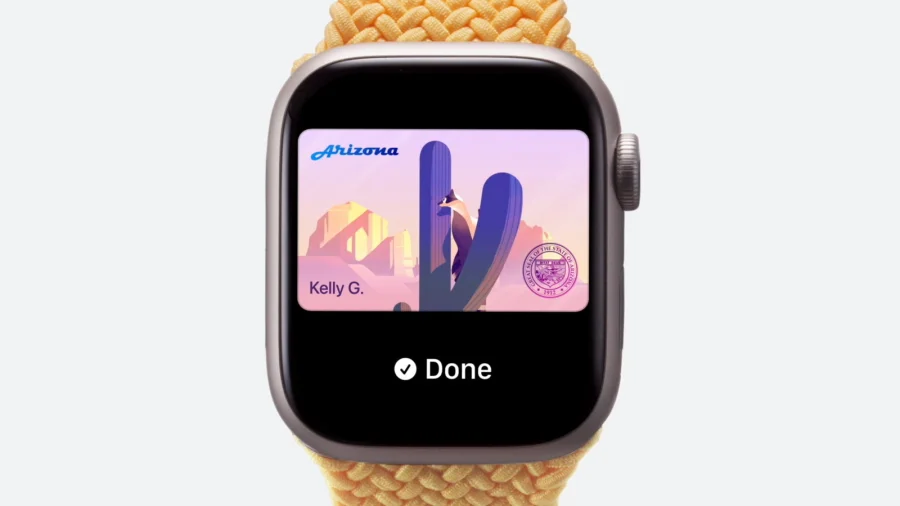
Keep carrying the physical card. Set it up on Apple Watch as a backup if your state supports it. Test it at a kiosk or checkpoint while you still have the plastic version in your bag. And make sure a low battery never decides how you get home.
What Could Change Next
The most likely path is steady, unglamorous expansion: more states, more airport lanes, more participating apps. Federal and state rules on legal acceptance are the variable that could slow things down or speed them up.
What is unlikely in the near term is a moment when you can confidently leave your license at home. That day depends on legislation, not software updates.
Our Take
Storing a driver's license in Apple Wallet is a genuinely useful feature wrapped in a frustrating reality: it works beautifully, in fewer places than the headlines suggest.
The right way to read this story is not as a replacement for your wallet, but as a second copy of your ID that lives in your pocket alongside everything else. Until acceptance rules catch up, the plastic card stays where it is — behind your phone.
Editor's note: Availability and accepted locations for digital IDs change frequently and vary by state. Confirm your state's status with its motor vehicle agency and check Apple's Wallet support pages before relying on a digital ID at a checkpoint, traffic stop or place of business.
Frequently Asked Questions
Can I add my driver's license to Apple Wallet in any state?
No. Only residents of participating states can add a driver's license or state ID to Apple Wallet. If your state isn't on the supported list, the option won't appear in the Wallet app and there is no way to force it.
Is a digital driver's license valid everywhere a physical one is?
No. Acceptance is limited to specific locations — typically select checks at participating airports, plus certain apps and businesses. Most everyday situations, including traffic stops and car rentals, still require the physical card unless your state's law says otherwise.
Is it safe to store my ID in Apple Wallet?
The credential is stored encrypted on the device and unlocked with Face ID or Touch ID, and the design intent is to share only the minimum information a reader needs. That said, privacy questions about what venues log and retain differ by jurisdiction and are worth checking for your state.
Do I still need to carry my physical license?
Yes, in practice. Until acceptance is broad and legally settled in your state, the physical card remains the document that works reliably in every situation.
What do I need before I start the setup?
A compatible iPhone, a working Face ID or Touch ID, your physical driver's license or state ID for scanning, and residency in a state that supports the feature. Your state agency then verifies your record before the digital ID is activated.