By [Author Name] | Consumer Technology & Devices
Apple spent years telling MacBook owners that USB-C was the only port they would ever need. Then, in 2021, it quietly put a magnet back on the side of its most expensive laptops. Today both charging paths still exist — and the one you pick quietly decides how many ports you have left, how fast your battery fills, and what happens when someone trips over your cable.
Two Sockets, One Laptop — and Apple Meant Both to Be Used
On today's 14-inch and 16-inch MacBook Pro, and on the MacBook Air from the M2 generation onward, you can charge through MagSafe 3 or through any USB-C/Thunderbolt port. Neither is a fallback. Apple supports both, and the machine will happily accept power from whichever you plug in.
That matters because most laptop advice assumes one "correct" charger. Here there isn't one. There's a fast, proprietary option and a slow, universal one — and the trade-off flips depending on where you are.
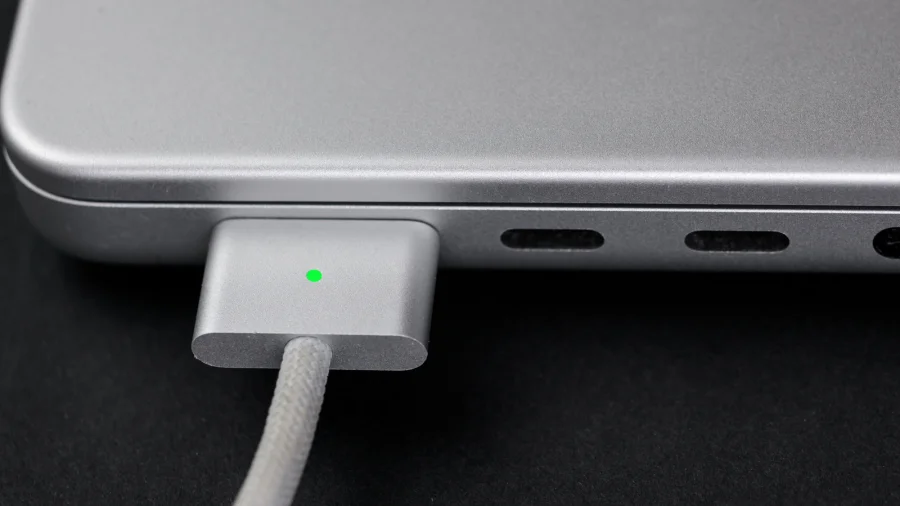
MagSafe 3: A Magnet, a Small Light and Exactly One Job
The connector is the entire pitch. It snaps on without you looking, holds firm during normal use, and detaches the moment real force is applied — the reason a stray foot no longer sends a laptop flying off a table.
MagSafe 3 also has an LED on the plug that glows amber while charging and green when full. It's a small thing until you've spent a year squinting at a menu-bar icon. And the cable itself is braided and ends in a USB-C plug at the adapter, which means the wall brick is an ordinary USB-C charger — the magnet is a connector decision, not a different electrical standard.
What it cannot do is carry data. Nothing but power moves through MagSafe.
USB-C: The Port That Does Everything Else
USB-C charging runs on Power Delivery, the same open standard used by Android phones, tablets, monitors, power banks and a growing pile of appliances. A single compatible brick can top up your MacBook, your phone and your earbuds.
That flexibility is the whole argument. Plenty of monitors deliver power over USB-C while carrying video, so one cable can light up your display and charge the laptop at the same time. Power banks can do it on a flight. GaN chargers the size of a deck of cards can do it in a backpack.
The cost is the port. On a MacBook Pro with three Thunderbolt sockets, charging through one leaves you two for everything else.
Wattage Is Where the Two Paths Actually Split
This is the technical heart of the MagSafe vs USB-C question, and it is less dramatic than it sounds.
Standard USB Power Delivery tops out at 100W. Apple's 16-inch MacBook Pro can take more than that — up to 140W — but only over MagSafe 3, using Apple's 140W adapter. Apple claims that combination can reach roughly 50% charge in about 30 minutes on that model.
On the MacBook Air side, fast charging begins at a 67W adapter, and USB-C handles it without complaint. On smaller machines, the gap between the two connectors narrows to almost nothing.
In other words: MagSafe wins on speed only on the biggest, hungriest MacBook Pro. Everywhere else, the difference is convenience, not capability.
The Trip-Hazard Test Most Laptop Owners Eventually Fail
Anyone who has watched a laptop slide off a café table knows the value of a breakaway connector. MagSafe's magnet releases before the machine does. USB-C holds on until physics wins.
But magnets have a second edge. Bump the cable hard enough and the plug pops out silently mid-charge. If you walk away from a desk expecting a full battery, a loose MagSafe connection is a quiet way to come back to a half-empty one.
Cables, Cost and the Accessory Trap
USB-C cables are everywhere and cheap — and also wildly inconsistent. A cable rated for phone charging may not carry the wattage your laptop wants, and some cheap adapters negotiate poorly or run hot.
MagSafe 3 replacements are fewer, Apple-specific, and priced accordingly. The connector has also been the subject of user complaints about fraying near the plug, though that is anecdotal rather than a documented failure rate.
The practical rule: trust supplied or reputable cables for anything above 60W, whichever route you choose.
Confirmed Specs Versus What Buyers Usually Assume
Confirmed by Apple's published specifications: MagSafe 3 supports up to 140W on the 16-inch MacBook Pro; MacBook Air fast charging starts at 67W; MagSafe 3 carries power only; USB-C charging is supported on both the Pro and the Air; MagSafe 1 and 2 chargers from older MacBooks do not fit MagSafe 3.
Less certain or dependent on your setup: exactly how fast a third-party charger will fill your specific machine, how warm it runs under sustained load, and how long a braided MagSafe cable lasts in daily use. Those depend on the adapter, the cable and the workload — not on the connector alone.
If two power sources are connected at once, most Macs prioritise the higher-wattage one, but it is not a feature worth planning around. Use one charger.
Why MagSafe Exists at All — Apple's Connector Moat
MagSafe is not just a kindness to clumsy users. It is a proprietary interface on a machine that otherwise went almost entirely open-standard. That means replacement cables, extra adapters and travel kits are bought from Apple or from licensed makers — a small but durable accessory business attached to every laptop sold.
It also creates familiarity. Mac owners who like MagSafe tend to notice when it's missing, which is exactly the kind of hardware identity that keeps people inside an ecosystem. USB-C gets the work done; MagSafe gets remembered.
The Fine Print: Heat, Wear and Cheap Cables
The honest case against pick-one thinking is that both approaches carry risk. USB-C ports take mechanical wear every time you plug in, and the port you charge from is often the port you also use for a dock. Heavy use shortens its life.
MagSafe removes that wear from your Thunderbolt ports but concentrates it on a single Apple-specific cable that is harder to borrow and harder to replace at short notice.
Fast charging, meanwhile, generates heat in every case. Apple's power management is generally conservative, but charging at 140W while rendering video is not the same as charging overnight — and treating it as free has a cost over years.
None of this makes either option wrong. It does mean the "best" cable depends on what you're willing to trade.
From 240W USB-C to a Magnetic Comeback: The Wider Shift
Two trends are colliding. Regulators, led by the European Union's common-charger rules, have pushed the industry toward USB-C as the default for nearly everything. At the same time, laptop makers keep reintroducing breakaway connectors because customers ask for them.
USB Power Delivery has also been extended well beyond its original 100W ceiling, which means the wattage argument in MagSafe's favour is narrower than it was a few years ago — and likely to narrow further.
The result is a rare situation: the industry standard and the premium connector are both improving, which is good news for buyers and mildly awkward for anyone hoping for a single clean answer.
What to Do With Your Charger Tonight
If you work at one desk most of the day, keep the MagSafe cable there. You keep all your Thunderbolt ports free, you get the fastest charge your MacBook supports, and the LED tells you the state of things at a glance.
If you travel, carry USB-C. One brick for laptop, phone and tablet beats three, and you can usually charge from a monitor, a power bank or an airline socket. Buy cables rated well above your laptop's draw, not just above your phone's.
If you own a 14-inch MacBook Pro or a MacBook Air, don't overthink it. Use whichever cable is nearest; the speed difference is small enough that convenience should decide.
What the Next Two Years of Mac Charging Look Like
Expect USB-C to keep getting better and MagSafe to keep being the nicest cable on your desk rather than an essential one. Higher-wattage Power Delivery is already standardised, and more monitors and docks will deliver meaningful charge alongside video.
The one thing unlikely to change: Apple will keep shipping both. The magnet is too popular to drop, and USB-C is too universal to abandon.
Our Take
The framing of "MagSafe or USB-C" is slightly wrong. For most MacBook owners these are not competing products but two tools for two situations — a fast, tidy, port-saving cable for the place you sit still, and a universal one for everywhere else.
Apple's own behaviour gives the game away: it reintroduced MagSafe not because USB-C failed, but because the magnetic release solved a problem the standard never addressed. USB-C solved the interoperability problem. Both are still solving something.
So the better question isn't which one wins. It's whether you're optimising for speed at your desk or flexibility in your bag — and whether you've bought a cable good enough to actually deliver either.
Frequently Asked Questions
Is MagSafe faster than USB-C for charging a MacBook?
Only on the 16-inch MacBook Pro, where Apple supports up to 140W over MagSafe 3 versus roughly 100W over USB-C. On the 14-inch MacBook Pro and MacBook Air, both connectors deliver fast charging and the difference is minimal in everyday use.
Can I charge my MacBook with any USB-C cable and adapter?
It will usually charge, but not always quickly. The adapter must supply enough